
We thought we should put out a blog post dedicated to Facebook seeing as it has been going through a few major changes that will affect everyone that has a Facebook business page.
If you haven’t embraced the changes they are due to be imposed on you on the 31st March.
With over 1.8 million people using Facebook in Ireland we would suggest that every business should be being proactive about the platform. In this article we will take you through some of the business page changes and the impact of these.
We will also discuss the running of competitions and how to generate more interest in your page.
The biggest change of all will be the new Facebook philosophy – since the Initial Public Offering in February 2012 Facebook will now be under pressure to deliver financially for its investors.
We will see the platform becoming more and more monetised and we predict that many of the tricks and gimmicks that we have all been using to boost our page fan numbers will be outlawed and in future if you want to do this you will have to advertise – pure and simple.
Facebook need to start delivering for their investors and will have to manage the balance between maintaining a credible and enjoyable social platform and a place where advertising will be pushed more on all of us.
This change of dynamic will affect how we use Facebook and the March changes are the first big hint of this.
Business Page Changes
The whole look and feel of your Facebook business page (personal profile pages have already changed) will change totally on the 31st March and some of your previous features will not work any longer.
You will need to do a few things to maximise the opportunities here. Besides some new visual changes a timeline has also been introduced where at a glance you can view a chronological history of posts on the page.
Our view is that these changes if embraced properly will deliver an even more impactful page for your business.
(For those of you operating your business from a personal page we would advise changing over immediately as this is not allowed – it is possible to convert from one to the other with friends coming across as fans).
Visual
Your own key visual identity will be delivered by two key visuals.

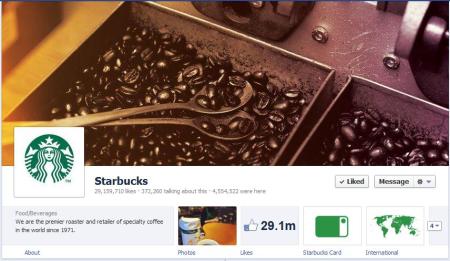
A (see image above) – Thumbnail
Your thumbnail will more than likely be your company logo and this appears on the bottom left of the main image that a viewer will see on your page. This should be 180 x 180 pixels in size.
Every time the page owner makes a post this thumbnail will appear alongside the post.
B (see image above) – Cover
The main banner image is a new feature introduced by Facebook. It is referred to as a “cover” and it stretches above the thumbnail across the page. This image can be a maximum of 851 pixels wide by 315 pixels high.
Facebook have very specific rules about the content of the “cover page”.
It should be an image that captures the business as best as possible but must not include offers, contact details, web address or any “like” us text. The basic logic here is that this information is available elsewhere on the Facebook page.
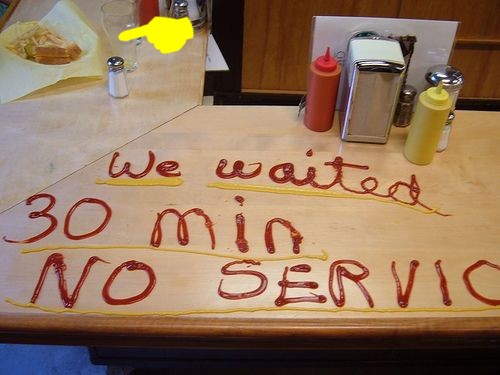
It is clear that the new rules prevent the business from advertising or encouraging the user to “like” the page on this cover page.
Our design team are currently preparing new cover pages for a number of clients.
This is a really good opportunity to make your page stand out from competitor pages – grab it!
Landing Page
Before it was possible to specify a “landing page” (see example below) that a new user on your business page was directed to when they first visited.
This was often a customised and highly visual promotional landing page, which encouraged likes, promoted the business or offered the user the opportunity to enter competitions.

This is not possible now using the new layouts and these customised landing pages will be redundant. It is still possible to have a tab that will host competitions and promotions but you can no longer dictate that a user of the page will “land” on this page.
Menu tabs
The menu tabs that were available on the old format on the left hand side of the page are now displayed as tabs in the main display just below (see Starbucks example above) the new cover visual.
It is only possible to display four tabs across the page. The other tabs/applications are available from the right of these displayed tabs by selecting the “down arrow”.
At any time it is only possible to display a maximum of 12 tabs/applications. It is possible to select your own choice of tabs to display on the main page except for photos, which will always display first.
You can do this by clicking on the “down arrow” which will display all the tabs. From here you can swap between tabs that you wish are displayed in the main view.
Posting
You can post as normal but there are a few new features.

Pinning a post – It is now possible to pin a post, which effectively means it will be featured and stay at the top of the page for 7 days.
Other subsequent posts will appear below this post in the stream. This is done by selecting the “pin to top” option (see visual above) that is available to you at the top right corner of each post. You would use this to position your most important post at the top of a page for each new visitor to see first.
Star post – when you “star” a post it will stretch across the full display instead of appearing on the left as a normal post. This will give that post more prominence on the page and it is very useful if you have posts with a lot of content.
Hide/delete post – it is now possible to hide a post (& unhide after if required). When you hide a post it will still display in the “activity log” as a post. As before it is also possible to permanently delete a post.
Change date of post – it is possible to alter the date of a post so that it will appear in a different position on your timeline.
Milestone – it is now possible to create a “milestone” post, which is a way of marking special events in the life of the business such as a product launch or key event. This feature allows you to upload a photo and specific the milestone date.
Personal User view
The display of your business page is totally customised for each user.

When a user visits a business page their own friend’s activity with that page will appear on the right hand side (see Mad Men visual above) making their experience with the page more informed and personal.
Display View
A user can view different aspects of the business page by choosing from the menu that appears at the top of the page once you start (see image below) scrolling down.

From here the user can choose from the menu of Apps/tabs, choose from the timeline or select different types of highlights.
The timeline can also be accessed directly from the time bar on the right hand side of the page.
Messages
The messages facility is new to Facebook business pages and is a very significant development. Fans of the page can now send a “message” to the page directly if they want to communicate as an alternative to posting directly on the page (which would be visible to all users).

These messages can be viewed and responded to in/from theadmin panel (top of your page). It is possible to shut off this feature preventing fans of the page to send messages.
It is really important that messages are responded to promptly.
Other Features
There are a few new features worth mentioning.
Approval of Posts – it is possible that you can change the settings so that all posts require approval before appearing as posts on the page (this feature can be accessed by going to the Admin Panel, choosing Manage Page tab, Edit Page, Manage Permissions menu)
Activity Log – from the admin panel it is possible to access a log of all posts by type
Insights – there is now more data available to track the success of your activities
Competitions
This is now a very tricky area for every business who has been building numbers of fans on their page by offering prizes.
The facebook guidelines are quite strict and the new format, which cuts out landing pages where businesses have typically hosted competitions will make it even more difficult.
If you want to run a compeition you will need to:
- Host it on an app/separate canvas page
- State clearly that it is not endorsed by Facebook
- Ensure that the entry criteria does not involve a Facebook activity such as “liking”,”sharing” or “commenting” – for example it could involve answering a question
- Ask each entrant to give seperate contact details
- Inform the winner independently of Facebook (by email or phone)
- Only announce the winner on Facebook once they have been informed and have given their permission

The competition can be mentioned on the wall of the page but cannot be featured on the page.
It would be an idea to mention the competition in a post and then to pin the post to the top of the page, keeping it there above other posts for at least 7 days.
Winning on Facebook
So – with all of these restrictions how can you build your numbers on your Facebook business page and really start engaging with fans?

Content, content, content is the answer…
Without any big fancy tricks or gimmicks you need to give fans good reasons for coming onto your page.
Maybe it will be ..
Because they like you and like what you say
Because they are the first to learn about new products, events and sales?
Because you ask for their opinion and they enjoy giving it
Because you say really interesting things that they enjoy
Because they learn things from your page
Because you give good advice, provide useful tips and information
Because you are really funny and cheer them up
Because you run good competitions and promotions
Because you operate a really great business and they want to express their thanks – a live testimonial!
Because there are really useful Apps on the page
Because they want to feel part of something special
Its important that you achieve all of this through regular posts that are varied, visually interesting and not at all “spam like”.
Over 29.2 million people “like” the Starbucks business page – that’s a lot of coffee drinkers!
“Like” – If you want to boost your page numbers think of this simple word!
While we are having this conversation why not Like the Fuzion Facebook page – we need to catch up with Starbucks!
Social Media Training
If you require assistance with your Facebook activity or any other aspect of your Social Media presence including your overall strategy, blogging, Twitter or LinkedIn use please give us a call.
Fuzion provide Social Media Consultancy, one to one training and run courses for various organisations incuding the Enterprise Boards and the Digital Marketing Institute.
Your 31st March to-do list
We have mentioned a lot of issues and changes but the main things that you need to concern yourself with for the 31st March are:
- Maximise your visual opportunity through a customised cover age (851 x 315 pixels)
- Decide on the tabs that you wish are displayed on the main page
- Review your settings that allow visitors to post
- Decide if you wish to allow fans to leave messages
Until next time.. keep liking !!
Greg Canty is a partner of Fuzion


 Greg Canty Fuzion Blog