Archive for the ‘Social Media’ Category

13 Tips About Blogging & making some noise!

August 23, 2012
Blogging Tips by Greg Canty, Fuzion PR

What’s it to be?

Blogging is a great way to demonstrate your expertise and get your message out there and I find more and more we are encouraging our clients to jump in and let the world hear what they have to say ….make some noise!

Once your blog post is written it makes great raw material to feed your social media activity or even to pitch to the media if it is in relation to some issue that is quite topical. Interested readers (hopefully some of these are potential customers) can subscribe to your blog and will then get automatic updates whenever you post something new.

This all sounds fabulous and it really is once you are up and running but the tough part is starting!

Often I find a client will put a week’s thought, deliberation and work into a single blog post and the monumental effort will ensure that it will be their first and last – writing isn’t easy, it is a skill that needs to be practised the same as anything else and I guess it comes easier to some than to others.

What I can promise is that once you are up and running it will get easier and easier, but you have to allow yourself  a learning curve and you will soon discover a style that you are comfortable with.

Get it right and not only will you enjoy it, but it will help to bring you and your business visibility, which should help to bring you business.

Blooging Tips by Greg Canty, Fuzion PR

Power blog!

I have put together a few tips about blogging that might help you along the way!

  1. Keep the blog post as short as possible (just enough to make your point)
  2. Try to write in the “first person” if possible
  3. Avoid using technical/industry jargon (unless it is for a very technical audience)
  4. Keep it topical (where possible try making your point using some issue that is current)
  5. If the blog post is taking more than half an hour to write then you are probably thinking about it too much!
  6. Always try to include a relevant visual – people love pictures!
  7. Blog as frequently as possible (at least once a week is a good target)
  8. Mix your topics and don’t be afraid to let your personality shine through
  9. Keep a note book (your smart phone might help) to jot down ideas for blog posts – they will come to you at the strangest of times, believe me!
  10. Optimise your keywords – if you want your blog post to be found try to work the important keywords (the ones that a typical user might use if they were searching on the topic) into the blog heading, the first paragraph and your keyword tags. Make sure you categorise and tag your blog post once it is done.
  11. Include hyperlinks (simply the web addresses of other relevant content) – links to your website, links to the writers LinkedIn Account, links to other resources on the web.
  12. Blogging is just the start – make sure you push it out through your social media channels to get value for all of your hard work
  13. Unlucky for some but not for you – Go on …..www.wordpress.com , what are you waiting for?

Looking forward to reading what you have to say

Greg Canty is a partner of Fuzion

Fuzion offer Social Media Consultancy and Training in Dublin and Cork

Sometimes are you better off not saying the right thing?

August 19, 2012
terrible names for a business

Must be a great shop!

At this stage between the initial briefing meeting and the time spent researching and working on the plan we have spent well over a day’s work before we meet with the prospect and present our Marketing\PR plan for his business.

This is always a tricky stage for us – if you want to have a chance of winning the new account you have to punch in the time, put in the research, brainstorm and put all your best ideas and thinking into the plan.

We don’t get paid for this but we do obviously hope that the client likes what we are proposing and then engages us to execute the plan for them – Put your best foot forward if you are serious about winning the business.

We are two hours into our presentation and the prospect seems to be embracing the plan and it is all looking very positive. Our plans are always quite comprehensive and cover everything from being found on-line, a review of marketing collateral and website, a PR plan including ideas that should generate the right media coverage and a social media plan to accelerate all of these efforts.

At the end of the presentation, while everything seems to be going well there is one huge, risky issue that we wish to discuss.

We feel your business name isn’t right” we gently explain to the prospect. This could be as delicate as telling someone you don’t like their child’s name!

But what about my website, my branding, the money I’ve invested to date in advertising, pushing the name out there?” he asks.

It is saying the wrong thing about your business, it is giving the wrong impression of what you are about” … he seems to be digesting and contemplating what we are saying , so we continue “we feel strongly that we would be doing a huge disservice to you if we drove on with a plan without first addressing the issue of your business name“.

After a few minutes he admitted that he always had some concerns about the name “fit” and we were the only (maybe foolish?) ones he met that had raised the issue.

We presented him with some alternative names that we felt more accurately captured the essence of the business offering and he seemed genuinely interested in them.

In truth we could have made life easier for ourselves and probably for him by just ignoring the business name issue and presenting a plan that was in keeping exactly to the brief.

He asked us to leave the plan with him to mull over while he went on leave and we are still waiting to hear…

Sometimes are you better off not saying the right thing?

(p.s. – We’ll let you know how this one turns out!)

Greg Canty is a partner of Fuzion

Fuzion are a PR firm with offices in Cork and Dublin

Blaming Twitter – Tom Daley

July 31, 2012
Tom Daley - Olympics Twitter

What will I tweet?

An insensitive fool sends a tweet to British Olympian Tom Daley telling him “he let his dad down” , after Tom and his synchronised swimming partner, Peter Waterfield narrowly missed out on medals at the Olympics yesterday.

Tom’s dad Rob passed away in 2011 from Brain cancer. How dumb was that tweet? ….then again, how often do we hear people saying dumb things?

The tweet is dominating the Sky Sports News headlines this morning and authorities are going to “conduct an investigation“. On the way into work I heard they have the tweeter tracked down and he is going to be called in for questioning …for a dumb tweet, now that is also fairly dumb!

This whole incident will open up the debate and the inevitable conclusion by many, will be that Twitter is to blame.

This story reminds me of a debate I have regularly with a friend of mine who was a very prominent broadcaster a while back. She gives out about social media, doesn’t see the point of it and is generally very sceptical about its whole existence.

I remember one particular day she rang me all enthusiastic as she finally had great evidence that would prove her point of view. The famous singer Sinead O’Connor had just tweeted that “she was looking for a big hairy man“!

I just pointed out to her that Sinead O’Connor has always had a tendency for saying strange things – now she just has another place to say them!

Twitter is an open platform (you can control this with your personal settings but most users leave their profiles open) where everyone can tweet whatever they have to say – Yep, often this does include quite dumb stuff!

Celebs, sports personalities and even politicians use it to boost their profiles, to make a point, to promote events or products. They can get a huge benefit from it if they use it properly. Mere mortals like ourselves and that dumb tweeter can also jump in there, lap it up and punch away at our keyboards pushing our own little messages out there, whatever those might be.

Like everything else in life if it’s interesting I’ll listen and if it’s not I won’t – if that person is an insensitive fool or I just don’t like them I can simply block them.

Tom Daley did the right thing and retweeted what that fool had said and easily exposed his “dumbness” – that was the very best way of dealing with the situation. As I write Tom Daley has 783,041 followers on twitter – I would call that job done!

So, forget the further action by the authorities, forget the twitter bashing, embrace that we do live in a free society where we are free to speak.

But remember if you say something dumb, a lot of people can get to see it …

Greg Canty is a partner of Fuzion

Fuzion with offices in Cork and Dublin provide social media training and consultancy

Grabbing the “Say Something” Opportunity

July 29, 2012
Say Something - Social Media Training

Accept, Ignore or Say Something?

I just opened my LinkedIn inbox and as always I am delighted to see that there were two invitations sitting there – one from Jim and the other from John. I don’t think I know either of them but that’s not too unusual with connection requests.

For me the big issue isn’t whether I “Accept” or “Ignore” the request but it is what am I going to do with that opportunity that presents itself?

Click, click and I have accepted both these invitations, two more onto my LinkedIn Connections scorecard! – another job well done?

If I do that I have just blown my opportunity to connect ..

If you are serious about using LinkedIn as a platform for boosting awareness and generating meaningful connections then you need to start using the opportunity properly.

There is lots that you can do on LinkedIn but the first way that you can really start making a difference is by “saying something” when someone connects with you.

How about after you hit that accept button you send a simple message… “Thanks for connecting, how is business with you?

I always thank whoever has gone to the bother of connecting with me and I always ask them some sort of question. I find 99% of the time they come back with a response and before you know it, you are actually building a “connection” – do this right and you get to learn something about them and you get a chance to tell them something about you and your business.

Last week I connected with over 100 new contacts that I had on my email database that were using LinkedIn – nearly everyone accepted the connection request.

Just one took the time to say something.

Are you collecting numbers or making connections?

Go on..  say something

(for those readers that are not using LinkedIn it is a great way to make connections and generate awareness for you and your business – jump in!)

Greg Canty is a partner of Fuzion

Fuzion are a Marketing and PR firm with offices in Dublin and Cork 

Social Media – End of the Auto-Post?

July 2, 2012
Social Media Training - LinkedIn

How often do you post an update on LinkedIn? – thought so !

Over the last few days you may have noticed a message from LinkedIn advising that your “tweets” will no longer appear automatically as status updates on LinkedIn.

If you didn’t have this feature switched on it obviously makes  no difference to you but if you did you need to consider how this affects your social media activity.

Twitter to LinkedIn

I’m not sure what is behind this change but I am suspecting that LinkedIn may want you to post directly from their platform – at least this way you will have to open up your LinkedIn dashboard to make a post and hopefully (for them) notice some adverts that are of interest to you. Clicking these makes them money by the way!

The big problem that I see here is that most people do not consume their social media from LinkedIn – yep, we connect, search for contacts but very very few of us are actually consuming – am I wrong? Is this their effort to make themselves part of the conversation and more relevant?

LinkedIn to Twitter

You can see from the graphic above that it is still possible to push your LinkedIn posts to Twitter once you click the little twitter box at the bottom of the post.

Twitter to Facebook

Another recent development I have noticed is that my Twitter posts are no longer being pushed to Facebook  despite all the connections being switched on. I have disconnected and refreshed the connection but it has made no difference.

I am starting to think that Facebook like LinkedIn want the user to log on directly to their platform to post updates, again in the hope that you will spot some adverts and make them a few bob!

Facebook to Twitter

I’m not sure if it is a coincidence but in line with this lapse in functionality Facebook are promoting their auto posts to Twitter feature quite actively when you log on. Hmmm ..

Robot Using a Computer!

Automation isn’t always good ..

Consequence?

So what does all of this mean to the heavy social media user who is quite active on all platforms and was enjoying the benefit of these time saving applications. Effectively you could post once on Twitter and this post would replicate on both Facebook and LinkedIn. This is what I was doing myself.

Maybe it’s a good thing?

I think you should embrace the change and treat it as a good thing.

Auto posts from Twitter were never the best idea for a number of reasons:

  • You can allow yourself to post more often and repeat posts on Twitter (this frequency could come across as “spam” on Facebook and LinkedIn)
  • If you have posts of a visual nature you are better going to Facebook and posting there directly – when you post from Twitter any link was just appearing as a link.
  • The platforms are quite different and while auto-post can be ok most of the time, often your “tweet” may be inappropriate on LinkedIn and maybe on Facebook
  • I find that if you use the “auto-post” feature you actually start to miss some of the action on the other platforms – they all do a different job for you, don’t forget that.
  • Users of LinkedIn and Facebook may not get all of the @gregcantyfuzion and the hash tag #FF, #Positivity “stuff” and can find it quite annoying and distracting from the actual message

My best advice is to treat each of the social media platforms differently, post separately as appropriate and for ultimate control use tools like Tweetdeck or Hootsuite as time saving devices. Using these you can select the destination for each of your updates (be it to any of your twitter accounts, your facebook personal or business pages).

The schedule facility on these platforms is an extra bonus, which can also be very handy.

LinkedIn

Regarding LinkedIn status updates I don’t see the change making the platform more relevant – If anything it could actually have the opposite effect!

If you wish to make an impact here try:

  • Participating in discussions on Groups you have joined
  • Start discussions in Groups you have joined
  • Start Asking and Answering Questions that have been posted for your industry sector/area of expertise

But I don’t have the time .. (this must be the one thing I hear most from people about social media)

Heh, that’s not my problem …if you have figured out that social media is good for your business then you’ll make the time!

Happy Posting ..

Greg Canty is a partner of Fuzion PR

Note:

If you need a helping hand with your social media effectiveness check out our Social Media Training / Social Media Consultancy services.

Facebook – It’s all about Timing!

June 25, 2012

After the major changes that we saw with Facebook Business Pages (for me they converted these pages into mini-websites) at the end of March and after the global social media giant went public shortly after, we have now seen a few more little but quite significant changes that have improved the functionality for all business users.

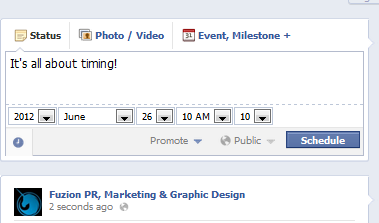
Facebook - scheduling your postsTiming!

Now it is possible to schedule your posts on your business page – the next time you start to post click on the little “clock” button below the window, which opens up a range of options that will allow you to schedule a post by year/month/date/hour/minute.

This is an excellent function that allows a busy business owner to schedule posts when they get a chance. It’s clearly best to be on-line so you can respond quickly to  comments but at times this may not be possible.

Hierarchy for Administrators

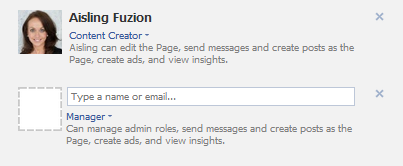
adding administrators on facebookWhen we work with clients and students at our social media training sessions I used always give them the “Admin Warning” – basically all administrators are created equal. Effectively someone you make an Administrator of your business page on Facebook immediately had the same power as you and could actually remove you if they wished.

This “feature” always petrified business owners – a disgruntled employee could cause a lot of damage with a few key strokes and some novel content!

Facebook have now created a hierarchy so it is now possible for you to give users Admin access but you can limit each users power. At the top of the tree there is the Administrator who has the power to allow and remove users.

Below this there are a number of different levels, each with decreasing powers using the headings; Content Creator, Moderator, Advertiser and Insights Analyst. This improved functionality allows a page owner to allow access to various individuals to work on the page but only to a level that they need to.

No doubt we will continue to see more changes that will make Facebook better and more relevant for business users … It’s all about Timing!

Greg Canty is a partner of Fuzion

Facebook – “Show Me the Money !”

June 11, 2012
Show me the money

Show me the money !!

I was doing a simple status update on the Fuzion Facebook business page and I noticed a “notification” window open up that I had not spotted before.

Promote this post to get more views and comments” the notification window shouted at me. I already knew that I could create an advert for specific posts but it had never been waved at me so blatantly.

Between the changes to business pages that went through at the end of March, the stricter rules about running competitions and no longer being able to specify “landing” pages, Facebook are really hitting the brakes on your ability to generate activity and “likes” without writing a cheque…. the free ride is over.

promoted posts - facebookFor the business page owner/administrator you need to provide huge value, personality and clever content to make it attractive for users to “like” your page or you must simply write a cheque.

Facebook is now serious business and we have officially entered the era of “Show me the Money

Greg Canty is a partner of Fuzion

The Social Media Salesman

April 29, 2012
Birth of a Social Media Salesman

Birth of a Social Media Salesman

This social media is a total waste of time, we’ve been at it now for over a month and it’s brought us no business” …. It’s not the first time I’ve heard that!

The prospective client that was in with us had a wine wholesaling business and had decided to take it online and had set up an e-commerce website and had also joined the world of social media with Facebook and Twitter pages and even a wine blog.

He was really frustrated as the orders weren’t rolling in and he was about to totally abandon his online efforts.

OK, I started having a peep over their activities and how they had approached their whole online efforts.

They had completed one blog post, they had just made a handful of social media posts in the month and they hadn’t interacted with anyone else on line. They had very few followers on twitter and even less fans on their Facebook page.

The guy who was responsible for the posting was too busy with his day job and was squeezing in his social media activity whenever he had some spare time if he remembered.

Fair enough ….. now tell me how your main business works?” I asked.

The company had three sales reps who reported into a sales manager. Each of the reps headed out each day in their company cars with their order book and called into their list of customers and also popped into some prospective customers. It took a good few years, a lot of hard work and determination to build up the business to the level it was now.

On each call the reps chat about their range of wines, the special offers, the new products and exciting things happening in the industry. They obviously chat about other things with their customers – everything from how their business is going to general chit chat. It’s really important to build a relationship with the customer and to understand them if you want to do business with them. “That’s what the good salesman will do” my prospect explained to me.

Why do we expect the same results from our efforts on social media without the same effort?

With all of our clients when we provide social media consultancy we look for a “Social Media Champion” from within the organisation who knows the business really well, who is willing to learn about each of the platforms, who understands how to communicate comfortably on them and who is prepared to put in the necessary time and effort to connect with users and to achieve results.

Mostly this is not a full time job but the “champion” must be given the time as part of their role to do this properly – think of this person as a Social Media Salesman.

Greg Canty is a partner of Fuzion

Keeping your feet on the ground

April 3, 2012
Greg Canty & Kevin O'Shea, Fuzion at the DMA's 2012

Boys looking sharp at the DMA's

It was a big night for me and the Fuzion crew.

We just received our new business cards with our new brand revealed as we headed out the door to the Nokia Digital Marketing Awards in Dublin at the National Convention Centre where I was a judge and we were sponsors.

We put on the glad rags for this very glamourous and prestigious affair and I made an extra effort taking out the white dickie bow …. very dapper (very Downton Abbey as someone said to me)!

Over we marched to the event and arrived early so we could liaise with the event crew about the workings of the Fuzion twitter quiz, which was to run between courses during the night. We were greeted by the event signage where our new branding was on display alongside household names such as Nokia. Dee kindly jumped in and photographed me and our fab creative director Kevin O’Shea in front of the branding …. all done quickly before people arrived!

The night was a huge success and a very proud one for us and for me personally. Our brand was on display constantly as the quiz ran during the evening and then came the moment when I had to go on stage and present Blue Cube with an award for the Best Social Media campaign – this was the “real deal“, opening the envelope, cameras everywhere and posing for photos ..

When I was walking from the stage Barry Murphy, the MC from Aprez Match fame made a comment that I should win a smart dressed award … this night was getting better and better!

We had a cool crew at our table including the “boys about town” from B Scene, Brendan Scully and Sean Montague who whisked us off to Lillies Bordello – do you think we had to queue? No chance …. our boys were so well known that our crew were whisked quickly in past the queue and marched straight upstairs to the VIP room.

We sat around, ordered our Mojitos  and chit chatted as the fab hostess looked after her bunch of VIPs!

Unable to contain myself I was busy tweeting about my fabulous night of accomplishments and all of a sudden I misjudged my balance, the stool wobbled and I quickly tipped backwards and ended up with my two legs up in the air with the full VIP section of Lillies looking at me ….. “pathetic drunk” …. no one said that but I’m guessing that’s what some of them were thinking!

Red faced I finished my drink, put my twitter machine away and asked if anyone fancied a whopper in Burger King.

Guess I needed to get my feet back on the ground!

Thanks for reading ….. (it was a great night)

Greg Canty is a partner of Fuzion

Facebook Business Page Changes – March 2012

March 23, 2012

We thought we should put out a blog post dedicated to Facebook seeing as it has been going through a few major changes that will affect everyone that has a Facebook business page.

If you haven’t embraced the changes they are due to be imposed on you on the  31st March.

With over 1.8 million people using Facebook in Ireland we would suggest that every business should be being proactive about the platform. In this article we will take you through some of the business page changes and the impact of these.

We will also discuss the running of competitions and how to generate more interest  in your page.

The biggest change of all will be the new Facebook philosophy – since  the Initial Public Offering in February 2012 Facebook will now be under pressure to deliver financially for its investors.

We will see the platform becoming more and more monetised and we predict that many of the tricks and gimmicks that we have all been using to boost our page fan numbers will be outlawed and in future if you want to do this you will have to advertise – pure and simple.

Facebook need to start delivering for their investors and will have to manage the balance between maintaining a credible and enjoyable social platform and a place where advertising will be pushed more on all of us.

This change of dynamic will affect how we use Facebook and the March changes are the first big hint of this.

Business Page Changes

The whole look and feel of your Facebook business page (personal profile pages have already changed) will change totally on the 31st March and some of your previous features will not work any longer.

You will need to do a few things to maximise the opportunities here. Besides some new visual changes a timeline has also been introduced where at a glance you can view a chronological history of posts on the page.

Our view is that these changes if embraced properly will deliver an even more impactful page for your business.

(For those of you operating your business from a personal page we would advise changing over immediately as this is not allowed – it is possible to convert from one to the other with friends coming across as fans).

Visual

Your own key visual identity will be delivered by two key visuals.

A (see image above) – Thumbnail

Your thumbnail will more than likely be your company logo and this appears on the bottom left of the main image that a viewer will see on your page. This should be 180 x 180 pixels in size.

Every time the page owner makes a post this thumbnail will appear alongside the post.

B (see image above) – Cover

The main banner image is a new feature introduced by Facebook. It is referred to as a “cover” and it stretches above the thumbnail across the page. This image can be a maximum of 851 pixels wide by 315 pixels high.

Facebook have very specific rules about the content of the “cover page”.

It should be an image that captures the business as best as possible but must not include offers, contact details, web address or any “like” us text. The basic logic here is that this information is available elsewhere on the Facebook page.
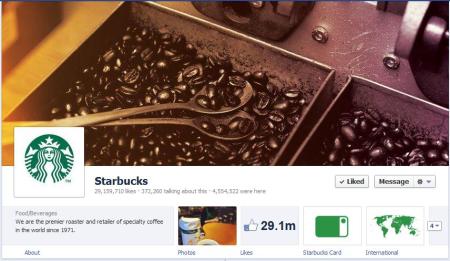
Starbucks on Facebook

It is clear that the new rules prevent the business from advertising or encouraging the user to “like” the page on this cover page.

Our design team are currently preparing new cover pages for a number of clients.

This is a really good opportunity to make your page stand out from competitor pages – grab it!

Landing Page

Before it was possible to specify a “landing page” (see example below) that a new user on your business page was directed to when they first visited.

This was often a customised and highly visual promotional landing page, which encouraged likes, promoted the business or offered the user the opportunity to enter competitions.

Facebook landing pages

This is not possible now using the new layouts and these customised landing pages will be redundant. It is still possible to have a tab that will host competitions and promotions but you can no longer dictate that a user of the page will “land” on this page.

Menu tabs

The menu tabs that were available on the old format on the left hand side of the page are now displayed as tabs in the main display just below (see Starbucks example above) the new cover visual.

It is only possible to display four tabs across the page. The other tabs/applications are available from the right of these displayed tabs by selecting the “down arrow”.

At any time it is only possible to display a maximum of 12 tabs/applications. It is possible to select your own choice of tabs to display on the main page except for photos, which will always display first.

You can do this by clicking on the “down arrow” which will display all the tabs. From here you can swap between tabs that you wish are displayed in the main view.

Posting

You can post as normal but there are a few new features.


Pinning a post – It is now possible to pin a post, which effectively means it will be featured and stay at the top of the page for 7 days.

Other subsequent posts will appear below this post in the stream. This is done by selecting the “pin to top” option (see visual above) that is available to you at the top right corner of each post. You would use this to position your most important post at the top of a page for each new visitor to see first.

Star post – when you “star” a post it will stretch across the full display instead of appearing on the left as a normal post. This will give that post more prominence on the page and it is very useful if you have posts with a lot of content.

Hide/delete post – it is now possible to hide a post (& unhide after if required). When you hide a post it will still display in the  “activity log” as a post. As before it is also possible to permanently delete a post.

Change date of post – it is possible to alter the date of a post so that it will appear in a different position on your timeline.

Milestone – it is now possible to create a “milestone” post, which is a way of marking special events in the life of the business such as a product launch or key event. This feature allows you to upload a photo and specific the milestone date.

Personal User view

The display of your business page is totally customised for each user.

MadMen on facebook
When a user visits a business page their own friend’s activity with that page will appear on the right hand side (see Mad Men visual above) making their experience with the page more informed and personal.

Display View

A user can view different aspects of the business page by choosing from the menu that appears at the top of the page once you start (see image below) scrolling down.


From here the user can choose from the menu of Apps/tabs, choose from the timeline or select different types of highlights.

The timeline can also be accessed directly from the time bar on the right hand side of the page.

Messages

The messages facility is new to Facebook business pages and is a very significant development. Fans of the page can now send a “message” to the page directly if they want to communicate as an alternative to posting directly on the page (which would be visible to all users).

These messages can be viewed and responded to in/from theadmin panel (top of your page). It is possible to shut off this feature preventing fans of the page to send messages.

It is really important that messages are responded to promptly.

Other Features

There are a few new features worth mentioning.

Approval of Posts – it is possible that you can change the settings so that all posts require approval before appearing as posts on the page (this feature can be accessed by going to the  Admin Panel, choosing Manage Page tab, Edit Page, Manage Permissions menu)

Activity Log – from the admin panel it is possible to access a log of all posts by type

Insights – there is now more data available to track the success of your activities

Competitions

This is now a very tricky area for every business who has been building numbers of fans on their page by offering prizes.

The facebook guidelines are quite strict and the new format, which cuts out landing pages where businesses have typically hosted competitions will make it even more difficult.

If you want to run a compeition you will need to:

  • Host it on an app/separate canvas page
  • State clearly that it is not endorsed by Facebook
  • Ensure that the entry criteria does not involve a Facebook activity such as “liking”,”sharing” or “commenting” – for example it could involve answering a question
  • Ask each entrant to give seperate contact details
  • Inform the winner independently of Facebook (by email or phone)
  • Only announce the winner on Facebook once they have been informed and have given their permission

Rozanne Stevens Cookery School
The competition can be mentioned on the wall of the page but cannot be featured on the page.

It would be an idea to mention the competition in a post and then to pin the post to the top of the page, keeping it there above other posts for at least 7 days.

Winning on Facebook

So – with all of these restrictions how can you build your numbers on your Facebook business page and really start engaging with fans?

Facebook Like Button
Content, content, content is the answer…

Without any big fancy tricks or gimmicks you need to give fans good reasons for coming onto your page.

Maybe it will be ..

Because they like you and like what you say

Because they are the first to learn about new products, events and sales?

Because you ask for their opinion and they enjoy giving it

Because you say really interesting things that they enjoy

Because they learn things from your page

Because you give good advice, provide useful tips and information

Because you are really funny and cheer them up

Because you run good competitions and promotions

Because you operate a really great business and they want to express their thanks – a live testimonial!

Because there are really useful Apps on the page

Because they want to feel part of something special

Its important that you achieve all of this through regular posts that are varied, visually interesting and not at all “spam like”.

Over 29.2 million people “like” the Starbucks business page – that’s a lot of coffee drinkers!

“Like” – If you want to boost your page numbers think of this simple word!

While we are having this conversation why not Like the Fuzion Facebook page – we need to catch up with Starbucks!

Social Media Training

If you require assistance with your Facebook activity or any other aspect of your Social Media presence including your overall strategy, blogging, Twitter or LinkedIn use please give us a call.

Fuzion provide Social Media Consultancy, one to one training and run courses for various organisations incuding the Enterprise Boards and the Digital Marketing Institute.

Your 31st March to-do list

We have mentioned a lot of issues and changes but the main things that you need to concern yourself with for the 31st March are:

  • Maximise your visual opportunity through a customised cover age (851 x 315 pixels)
  • Decide on the tabs that you wish are displayed on the main page
  • Review your settings that allow visitors to post
  • Decide if you wish to allow fans to leave messages

Until next time.. keep liking !!

Greg Canty is a partner of Fuzion